Poetry HTML Typesetting
Web design post-mortem of ways to typeset poetry and how we developed our advanced approach. Possible approaches are PDF plugins, PNG screenshots, semantic class soup, and Pandoc line blocks. Gwern.net has a two-tier system: div.poem for stanzaic verse with automatic enjambment, pre.poem-html implementing ‘Source Code WYSIWYG’ with Nimbus Mono L font and JS inline-width compensation. Covers slash/caesura syntax highlighting, responsive line-breaking, and LLM corpus cleanup.
Poetry is surprisingly difficult to typeset in HTML because poems sometimes require precise control over whitespace & layout, while HTML (and some formats compiling to HTML, like Markdown) by default collapses whitespace and doesn’t allow easy control of indentation. It is not as difficult as typesetting mathematics, but it’s still not trivial to do. We would like poetry to be searchable, copy-pastable, responsive, printable, compatible with inline annotations & collapses, and easy to author without “write-only” line noise or heavyweight academic encoding like TEI.
We evaluated and rejected most standard solutions—PDF plugins, PNG screenshots, Unicode spacing hacks, semantic “class soup”, and Pandoc line blocks—in favor of a hybrid approach: semantic wrappers for simple poems, and a custom
pre.poem-htmlelement implementing “Source Code WYSIWYG” for complex concrete poetry.These operate with simple JS interpretation of semantic classes &
<pre>tag, which can express most use-cases and satisfies most of our desiderata.For live examples, see “A Christmas Protestation”, “Silver Bird”, and especially “Apollonian #1”; for documentation, see the Style Guide; and for test cases, see the Lorem pages.
Background
How can I write Latin alphabet poetry on my website which:
Looks good
Responsive / works on mobile
Preferably uses progressive enhancement
Works on >95% of web users’ browsers per CanIUse.com
Supports all of Gwern.net’s features like inline or block elements like annotated links & collapses (epigraphs, text-centering…),
Has nice touches like styling newline slashes or “||” caesura marks,
Supports even the most complex poetry one might write like concrete poetry or calligrams,
And all this while still being easy to author in the long run (and not “write-only” line noise or heavyweight academic encoding like TEI)?
The last one is possibly the hardest: I can’t afford a “write-only” approach which relies on something crazy like wrapping every single line and stanza in a bunch of semantic classes, and where I will have forgotten it all 10 years from now. I want something where quoting a poem is almost as easy as everyone would normally write it, like "Roses are red / violets are blue", or
> Roses are red \
> Violets are blue
What are the solutions?
I didn’t know of any good systems, and the web browser situation seems little different from 2010 or 2021 (despite the incredible number of other fancy features added to web browsers). Because of the complexity of high-quality poetry typography in Pandoc Markdown for Gwern.net, I punted on this for a long time, but in 2025, I resumed my AI poetry work and wanted the results to look pretty, so I was forced back into the topic.
Gwern.net Solutions
I thought the best way to go was some variant on standard blockquotes and <pre> tags, and eventually I realized that <pre> tags could be modified to support powerful authoring with a tweak I called “Source Code WYSIWYG” (loosely inspired by “naked objects”). After discussion with Said Achmiz, we began testing my ideas out on the poetry I was writing.
I eventually settled on a system of simple span/div classes but also a variant of the <pre> tag, a custom quasi-WYSIWYG pre.poem-html element—all rendered in, unusually, a monospace serif font added for this purpose.
So to write poetry on Gwern.net:
if it is an inline quote,
span.poemwrapperSlashes and caesura marks are written exactly as normal.
simple block poetry,
div.poemwrapper on a<br>-broken series of<p>tags (possibly inside a<blockquote>) written in the normal backslash-escaped Pandoc syntaxThe intended lack of indentation or hanging indents from line-breaks happen automatically.
Intermediate complexity block poetry using enjambment uses this, but with built-in forward slash syntax
highly complex block poetry requiring arbitrary whitespace control uses
pre.poem-html
Complexity |
Markup |
Use case |
|---|---|---|
Inline quote |
|
“Roses are red / violets are blue” |
Simple block |
|
Most stanzaic poetry |
|
Line-breaks within stanzas |
|
Complex/concrete |
|
Calligrams, exact whitespace |
This page explains the discarded alternatives and the how/why of our HTML poetry typesetting system.
Overview
Approach |
Pretty |
Responsive |
Prog. enh. |
>95%? |
Inline elem |
Block features |
Sep. styling |
Concrete |
Search |
Authoring |
Editing |
|---|---|---|---|---|---|---|---|---|---|---|---|
PDF plugin / iframe |
◐ |
✗ |
◐ |
◐ |
✗ |
✗ |
— |
✓ |
◐ |
◐ |
✗ |
PNG screenshot |
✓ |
✗ |
✓ |
✓ |
✗ |
✗ |
— |
✓ |
✗ |
◐ |
✗ |
SVG (text-based) |
✓ |
◐ |
✓ |
✓ |
◐ |
✗ |
◐ |
✓ |
◐ |
✗ |
✗ |
|
◐ |
✓ |
✓ |
✓ |
✓ |
✓ |
✗ |
✗ |
✓ |
✓ |
✓ |
|
◐ |
✗ |
✓ |
✓ |
✓ |
✓ |
✗ |
◐ |
✓ |
✗ |
✗ |
Inline styles |
◐ |
◐ |
✓ |
✓ |
✓ |
✓ |
✗ |
◐ |
✓ |
✗ |
✗ |
Code block ( |
✗ |
✗ |
✓ |
✓ |
✗ |
✗ |
✗ |
✓ |
✓ |
✓ |
✓ |
Semantic “class soup” |
✓ |
✓ |
✓ |
✓ |
✓ |
✓ |
✓ |
◐ |
✓ |
✗ |
✗ |
Pandoc line block |
◐ |
✓ |
✓ |
✓ |
✓ |
✗ |
✗ |
✗ |
✓ |
✓ |
✓ |
|
◐ |
◐ |
✓ |
✓ |
◐ |
◐ |
✗ |
◐ |
✓ |
◐ |
◐ |
|
✓ |
◐ |
✓ |
✓ |
◐ |
◐ |
✗ |
✓ |
✓ |
✓ |
◐ |
|
✓ |
◐ |
◐ |
✓ |
✓ |
✓ |
✓ |
✓ |
✓ |
✓ |
◐ |
|
✓ |
✓ |
✓ |
✓ |
✓ |
✓ |
✓ |
✗ |
✓ |
✓ |
✓ |
|
✓ |
✓ |
✓ |
✓ |
✓ |
— |
✓ |
— |
✓ |
✓ |
✓ |
Pixel-Perfect
Like math, one solution is to outsource it all to LaTeX or PDF and just screenshot a pixel-perfect hand-adjusted layout, and insert that into your web page.
PDF Plugin
PDFs can be displayed in plugins or iframes.
This doesn’t work well for pixel-perfect poetry because it’s not pixel perfect in practice. You get little control over the PDF display—assuming a web browser even has PDF display capability (still not something to take for granted in 2026 as we ran into PDF-related iframe bugs in Safari & Chrome, with weak mobile support), you are at the mercy of whatever is showing the PDF. This has been a big problem on Gwern.net for our PDF transclusions, where, after enough work, a PDF will display inline in the web page… but with a big sidebar covering half the page that we never asked for!
PNG
A PNG is supremely pixel-perfect, portable, robust, and universal.
This is a reasonable idea for the most complex poetry, especially avant-garde work: it guarantees that you reproduce the poetry typesetting as intended. It is also often the only realistic option available on social media networks like Twitter or Instagram. And at small scales, it is the easiest option: just look up the poetry in whatever PDF or physical book or e-book you can find it in, screenshot it, and get on with your life.
But while it is supreme at accuracy and portability, it has too many drawbacks to enumerate: can’t be edited, not selectable or searchable, fixed width with no reflow or responsive support, no interaction or features like hyperlinks by default… You can try to work around these (eg. for modifiability, do a compiler plugin like ‘write LaTeX fragments in the Markdown and use a Pandoc filter to call out to a LaTeX compiler to generate a PNG inline’; for clickable links, image maps), but it gets ugly quick as you pile hack upon hack.
I am unaware of any major poetry websites which takes the ‘screenshot’ approach with their HTML. (Such publishers will typically instead distribute solely PDFs.)
SVG
An interesting option for typesetting poetry in a pixel-perfect and responsive, yet still textual, way is vector graphics by way of SVG. (In fact, Gwern.net makes a small use of SVG for precise typography, in its quad-letter text link-icons.)
I have seen no major uses of this approach (eg), and so cannot describe or critique it meaningfully.
Paragraph
So if you try to write a poem as just a <blockquote> with <p> and <br> tags, this will break as soon as you need to typeset a poem more complex than “roses are red”.
You run into problems:
What is the indentation?
A normal website will use indentation in one of two ways: (1) do not separate paragraphs with a newline but indent the next paragraph (this is what Gwern.net and most books do); and (2) separate with a newline, but do not indent the next paragraph (most websites). And for justification, whether it is fully justified or just left-justified, a broken line will not be indented.
For English poetry, at least one of these is wrong. Poetry is usually typeset with #2, so Gwern.net breaks one rule by default. And then all websites break the rule that a poetry line, when line-broken, gets indented (a hanging indent), so you can see that it’s a continuation of the prior line rather than the next line.
What is the whitespace?
Poetry will often use extra spaces or indent repeatedly, and might have ‘staircase’ lines where each clause is indented more deeply (eg. Walt Whitman). HTML will collapse consecutive whitespace, and everything disappears.
In Markdown, this is especially painful because it is not enough to write raw HTML tags: Pandoc will collapse whitespace between tags.
(This is why Pandoc’s “line blocks” are not a solution: while they do promise to preserve the leading whitespace, that’s all. They don’t solve the hanging indent or concrete poetry problems either. And on top of no internal whitespace, no block elements either. So there is little point in using it: it is just too underpowered, and solves only the easy problems.)

So, writing poetry with just those tags immediately looks wrong:
Roses are red
    Violets are blue,
Sugar is sweet
    And so are you.
One niche proposal, treating poems as lists, doesn’t seem to have any real redeeming advantages besides encoding some poem semantics by abusing lists, and fails to fix the whitespace/indentation problems, and so I won’t discuss that further, but move on to the most common solution.
Manual Spacing
Unicode
A partial solution to both issues is to resort to Unicode: inject enough non-breaking spaces , and you may be able to make something work.1 (This is sometimes used by major poetry websites like Poetry Foundation’s website.) Pandoc/HTML etc. will leave those alone and will not collapse them. So we could indent the second half of the couplets like this:
Roses are red
    Violets are blue,
Sugar is sweet
And so are you.An example from a major poetry website, Poets.org, of “r-p-o-p-h-e-s-s-a-g-r” (‘grasshopper’) by e. e. cummings:
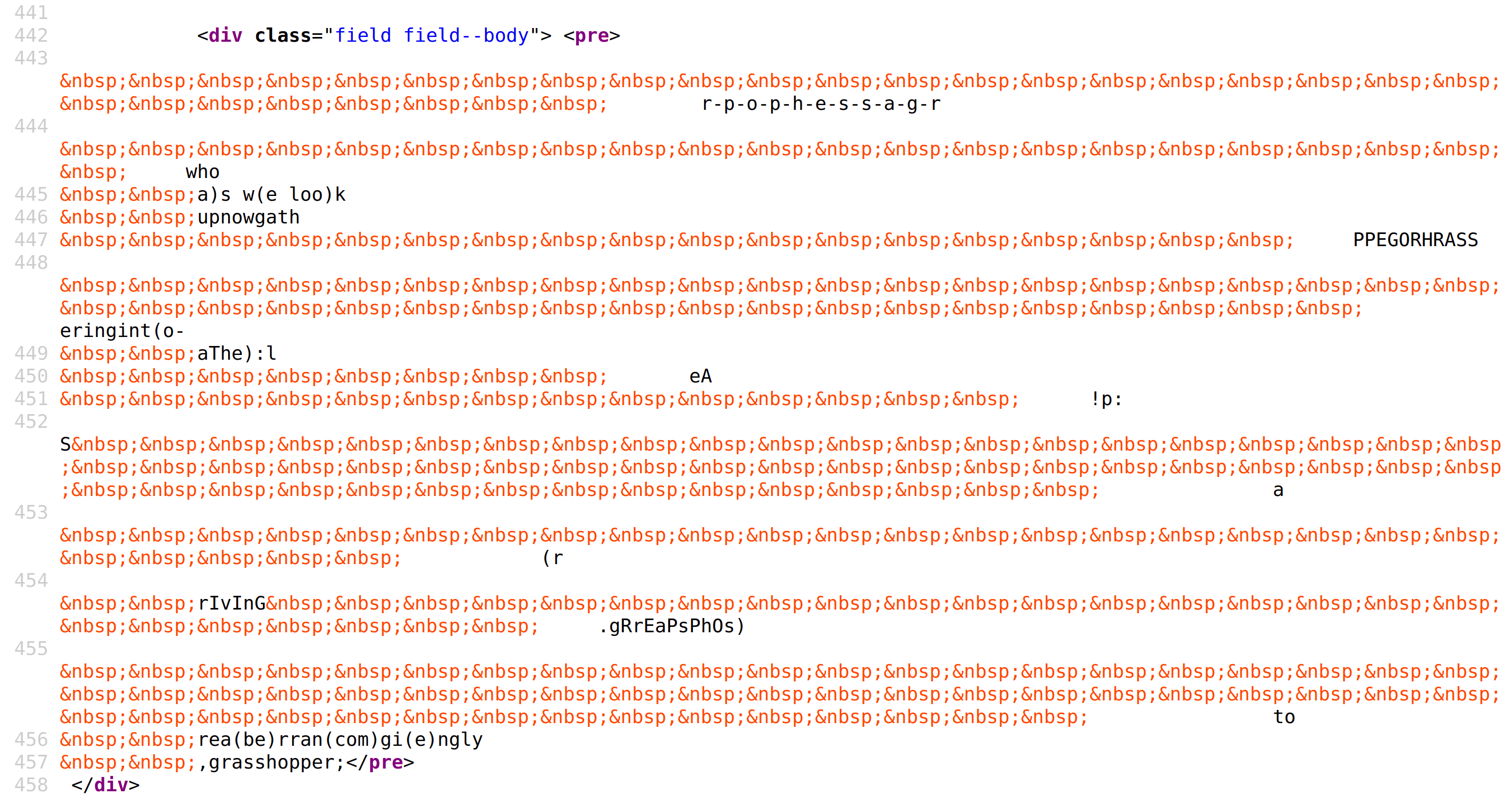
It is difficult to read, write, or debug a complex poem typeset using non-breaking spaces.
This is brittle—a nightmare to both write and edit.
And it is bad for responsive design because we are fixing the width, so we may trigger horizontal scrollbars and cut-off lines. (Plus lots of minor issues like the Unicode tripping up any readers who copy-paste your poems, unless you already have a JS copy-paste listener to clean up copy-paste stuff; we do2 but most websites don’t.)
It is also not even guaranteed to line things up as we assume: because the body font in question is probably a proportional font rather than monospace, and so even if we count characters and insert the whitespace after n characters in both lines, they will not necessarily be vertically aligned. So is fine for a small left indent but it’s a bad bet for aligning half-lines, tabular alignment, calligrams, or “make this word sit under that word”.
Inline Styles
One alternative is to inject indentation directly onto elements, like <div style="text-indent: 4ch;">. This is potentially useful as a compilation target, but has similar drawbacks to the non-breaking spaces, and is worse in some ways—eg. much harder to author by hand.
Code Blocks
Almost all website software, especially Markdown ones, will support some form of ‘code block’. Often this will be a <pre> <code> if it is a fancier one and wants to support syntax highlighting, but it may be a simple <pre> tag.
This lets one write a poem which will reliably preserve its whitespace and which will usually not be automatically indented. And if one wants any indentation, one can just write it by hand, eg.
Roses are red
Violets are blue,
Sugar is sweet
And so are you.So, this is easy to remember, and convenient to write. It also supports arbitrary whitespace, so we can do any ASCII art we want. (We can get a surprising amount of formatting that way.)
The downside here is that you lose most formatting capabilities. Almost all Markdown or CMS systems regard code blocks as being for literals, and so you cannot, say, hyperlink a keyword or add a footnote or even italicize a word!3 This doesn’t work, except with the most tolerant of readers:
[Roses are red](https://en.wikipedia.org/wiki/Roses_Are_Red)
    Violets are blue,
Sugar is sweet
    And so are *you*.
You also incur a lot of side-effects. It’s still fixed-width with no line-wrapping (because that might break source code!), so you have still have the old responsive & horizontal scrollbar problems. And you have brand-new problems: for example, code blocks are usually used with a coding font, which means monospace and often unusual glyphs for “confusables” to ensure that ‘0’ cannot be mistaken for ‘O’. So now your poems look like, well, source code. If we typeset our poems in our source code font, IBM Plex Mono, they look weird!
Dear Santa, pray accept this urgent plea
And burn your police reports regarding me.
I write to clear my name of wicked lies,
That cast me as a fiend in festive guise!

---

I've never peeped at presents through their wrap,
Nor rigged the cracker for a louder snap.
I haven’t pinched a mince pie from your stash,
Nor watered down your sherry, splash by splash.

I've not re-gifted socks from years before,
Nor tracked in mud across your workshop floor.
I've never pushed ahead in greeting lines,
Nor pilfered Advent treats from cardboard shrines.
Semantic Class Soup
Sometimes someone will suggest encoding all the semantics of poetry into HTML/CSS classes: div.line, div.stanza, span.indent etc., and then spackling around a lot of CSS to make it all come out right.
This can work, of course, with enough effort (and Project Gutenberg puts in the effort). All the indenting and line-wrapping can be overridden and restyled, and if not, just add some more classes & CSS special-cases. Alliterative verse with “||” caesura marks? Just add another class!
The main problem is that it becomes a nightmare to author poetry:
<div class="poem">
    <div class="stanza">
        <div class="couplet">
            <div class="line"><span class="line-half">In they hacked them,</span> <span class="line-half">out they hurled them,</span></div>
            <div class="line indent-partial"><span class="line-half">bears assailing,</span> <span class="line-half">boars defending.</span></div>
        </div>
        <div class="couplet">
            <div class="line">Sugar is sweet</div>
            <div class="line indent-partial">And so are <em>you</em>.</div>
      </div>
    </div>
</div>
And how do we support concrete poetry/calligrams anyway? And what is the accessibility story for screen-readers or AI, since these are non-standardized semantics which are invisible and there are no ARIA roles for “poetry”, especially compared to the other approaches with their explicit linebreaks or formatting characters like the forward slash…?
At best, this is a compilation target for some poetry DSL.
Preformatted Blocks
The problems there partially come from the <code>-specific CSS/fonts in the usual pre.code code block implementation. What if we just use the preformatted block? A pre in theory preserves whitespace literals and allows writing arbitrary HTML elements like <em> or <a> etc. And Markdown always passes through HTML it doesn’t understand. It is searchable, copy-pastable, should be screen-reader/LLM-friendly, and will even be printer-friendly (poetry is more likely than most material to be printed out). And it is compatible with additional CSS/JS features—like using CSS “counters” to add line numbers (eg. counter-increment with :nth-child(5n)::before to number every 5th line).
So, can I just write this?
<pre>
[Roses are red](https://en.wikipedia.org/wiki/Roses_Are_Red)
    Violets are blue,
Sugar is sweet
    And so are *you*.
</pre>
No, because you would pass that through literally. You’d have to write it all as HTML:
<pre>
<a href="https://en.wikipedia.org/wiki/Roses_Are_Red">Roses are red</a>
    Violets are blue,
Sugar is sweet
    And so are <em>you</em>.
</pre>
But it gets worse: the Pandoc API, at least with my Hakyll stack, does not preserve the spaces. (This is probably unfixable because I had to add in a pass to collapse whitespace to deal with other intractable Pandoc API problems related to reliable pattern-matching in AST traversal & rewrites.)
So you have to guard it carefully:
```{=HTML}
<pre>
<a href="https://en.wikipedia.org/wiki/Roses_Are_Red">Roses are red</a>
    Violets are blue,
Sugar is sweet
    And so are <em>you</em>.
</pre>
```
You may get a large box, and you also don’t solve the horizontal scrolling—preformatted means preformatted!
Preformatted Problems
Wrapping
You can work around those two issues with a little additional CSS: allow wrapping, disable any default styling your stack enables… Something like this CSS can allow wrapping while still preserving indentation:
pre.poem {
  white-space: pre-wrap; /* preserve newlines/spaces but allow wrap */
  overflow-x: auto;      /* still safe for pathological lines */
  /* Note: shrinking or expand text size is risky; better to use a different font, see later. */
}
(There is also white-space: break-spaces, which is closer to “literal spaces, but wrap”.)
Misleading Proportional Spacing
But there’s a bigger problem: you may think that you have a nice WYSIWYG way to write poetry… but you don’t, because you’re probably using a proportional font.
Consider this:
<pre style="font-family: serif"> <!-- set the proportional font explicitly -->
Roses are red
    iiiiiiiiiii blue,
Sugar is sweet
    MMMMMMMMMMM you.
</pre>
Do the end-rhymes ‘blue’ and ‘you’ line up like you expect? No, not even close, because it may be off by >50% from the monospace equivalent:
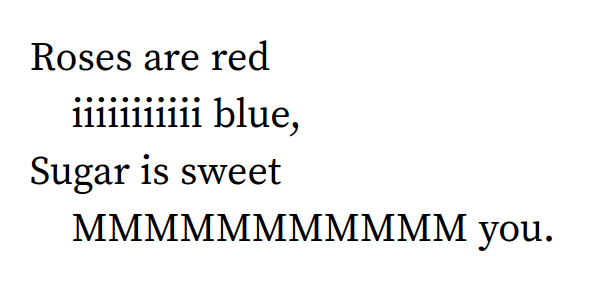
You can try to adjust it by hand, adding and subtracting non-breaking spaces by hand, but it can take trial-and-error since you have to check it in the final live version to be 100% sure, and may break at any time if your font or CSS or DPI or anything in the stack decides to change anything.
Pre Fix: Monospace Serif Font
Now, why don’t we use a monospace font? There are many monospace fonts which do not have coding ligatures or confusables… but it still looks ‘off’ to use a monospace font for poetry.
This is because poetry is so traditional and so often typeset in a serif font, while monospace fonts are usually sans, and that is strongly associated with coding, STEM, modernity, corporations etc.
Does a monospace font have to be sans? No, there’s no intrinsic requirement. Serifs are just little ornaments on the individual letters, they don’t change whether the font as a whole is proportional or monospace. They are sometimes “typewriter” fonts, like the famous Courier.
So we can just use one of those, and automatically, our preformatted text now does get aligned vertically. And this fact is baked into the font, so we can count on it.
Nimbus Mono L
There are, however, not as many monospace serif fonts as sans fonts. And the ones that are available are often either difficult to distinguish from a Courier, or lacking in some way like being proprietary commercial fonts (eg. Matthew Butterick’s Triplicate4) or having bad italics (synthesized fake italics or ‘obliques’ are disqualifying for poetry use), or far too obtrusively ‘typewriter’-looking (some go as far as to try to imitate ink smears or paper stains)
Some fonts we looked at were: CMU Typewriter, Courier Prime, Linux Libertinus Mono, Go Mono, & URW++’s Nimbus Mono L.5
I picked Nimbus Mono L for Gwern.net because it had good italics, it felt a little less typewriter-y, and more suited to longform reading than some of the rival fonts did (when I looked at inline text examples mixing it with our body font Source Serif Pro).
Our subsetted TTF fonts weigh 0.15MB uncompressed (0.04MB each), which is acceptable since they are used on only ~80 pages as of 2026-01-04, and most poems would need only 1 of the files. And of course we can use font-display: swap; loading to avoid blocking. Overall, we have not noticed a performance impact from adding a small auxiliary font.
Aside: Editorial Highlighting
This font search had a side benefit: we wound up reusing the monospace serif font for “editorial” insertions, denoted by brackets.
It’d always bothered me that it wasn’t clear what parts of annotations were the original authors, and which parts were my own insertions (which could sometimes be multiple paragraphs or highly opinionated). Alternatives like italicizing or typesetting them in Source Sans 3 either went too far (italicize multiple paragraphs?) or not far enough (even I had a hard time distinguishing Sans from Serif for short editorial insertions).
The Nimbus Mono L, however, hit a good intermediate mark, and so we enabled a div/span.editorial class for that which just typesets the editorial comments in Nimbus Mono L.
Source Code WYSIWYG: pre.poem-html
A pre block with Nimbus Mono L and appropriate indentation is now much of the way to what I want: a dead-easy, reliable way to write the most complicated ASCII-art-level poetry. We lose some niceties of Markdown, like automatic curly Unicode quotes, but that’s not a big deal—we can always write curl quotes manually as LEFT DOUBLE QUOTATION MARK/RIGHT DOUBLE QUOTATION MARK etc.
It still has some gotchas, however. Our proportional counterexample now works, but only if there are no inline elements.
If there are, like, say, italics, we immediately are off:
<pre>
Roses are red
        iiiiiiiiiii blue,
Sugar is sweet
    <em>MMMMMMMMMMM you.</em>
</pre>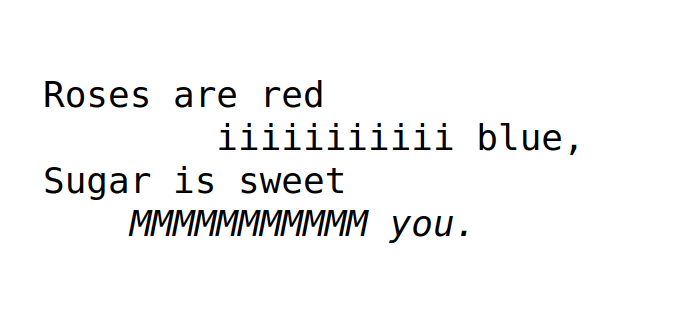
Our naive author wrote something that made sense, and is easy to edit and check—but is wrong when rendered, because the web browser subtracts the tags by interpreting them. (Why wouldn’t it?) Authors naturally align to what they see in their text editor, not to an invisible output downstream in a web browser DOM.
We could require the author to always painstakingly subtract exactly 4 left spaces for each <em> tag etc., mechanically, every single verse… but why are we having the author do it if it’s so mechanical? We should have the Pandoc compiler or browser do it. We would prefer to have something closer to what you might call “Source-Code WYSIWYG”, where the text editor view matches the rendered view.
So on Gwern.net, we define a custom pre.poem-html class where CSS+JS ensures that:
<pre class="poem-html">
<a href="https://en.wikipedia.org/wiki/Roses_Are_Red">Roses are red</a>
        iiiiiiiiiii blue,
Sugar is sweet
    <em>MMMMMMMMMMM you.</em>
</pre>
Will render exactly as the author expects it to. Even our earlier “grasshopper” example is easy to write on my website:
```{=HTML}
<blockquote>
    <pre class="poem-html">
    r-p-o-p-h-e-s-s-a-g-r
                               who
      a)s w(e loo)k
      upnowgath
                           PPEGORHRASS
                                                           eringint(o-
      aThe):l
                   eA
                        !p:
    S                                                                        a
                                          (r
      rIvInG                              .gRrEaPsPhOs)
                                                                             to
      rea(be)rran(com)gi(e)ngly
      ,grasshopper;
    </pre>
</blockquote>
```
Yields:
    r-p-o-p-h-e-s-s-a-g-r
                               who
      a)s w(e loo)k
      upnowgath
                           PPEGORHRASS
                                                           eringint(o-
      aThe):l
                   eA
                        !p:
    S                                                                        a
                                          (r
      rIvInG                              .gRrEaPsPhOs)
                                                                             to
      rea(be)rran(com)gi(e)ngly
      ,grasshopper;
JS measures each inline element’s tag-character width and injects compensating padding.
Conceptually, pre.poem-html treats inline HTML markup as if it had width in the source code. In a monospace <pre>, authors align by counting characters. But HTML tags vanish at render time, so the count changes. So the client-side pass inserts an equivalent amount of invisible padding (either CSS or non-breaking space—if the latter, the copy-paste listener must replace them) at each inline element boundary, preserving the author’s column arithmetic while still rendering the element as a link/italic/etc.
If JS is disabled, then because this is progressive enhancement, the poem will still display; the alignment will just sometimes be wrong. And performance-wise, it’s not too bad: on a page like “Apollonian #1”, the processing takes <0.04s, and can be optimized further.
Main limitation: in theory, this should be fully recursive, and handle nested & attribute-containing tags like <em><a href="foo">... as well as entities & unusual whitespace like tab characters… But the current Gwern.net JS implementation hasn’t been tested with more complicated HTML features, so we make no guarantees.
We can now write arbitrary poetry in a fairly straightforward way, solving the hardest problem. This satisfies our desiderata about as much as is possible.6 (This is easy to author but our CSS is more involved.)
With that dealt with, we can now turn to the easier cases.
Simple Inline
For most poetry, pre.poem-html is overkill.
First, what inline poetry do we need to support? We need to support quotations like "Alas, poor / Yorick! I knew him, Horatio—a fellow of infinite jest". We can define a span.poem, and that will be typeset in monospace serif for consistency.
Slash Syntax Highlighting
I found the " / " separator to be a little obtrusive, and so we added a JS rewrite to set it in a lower font-weight:
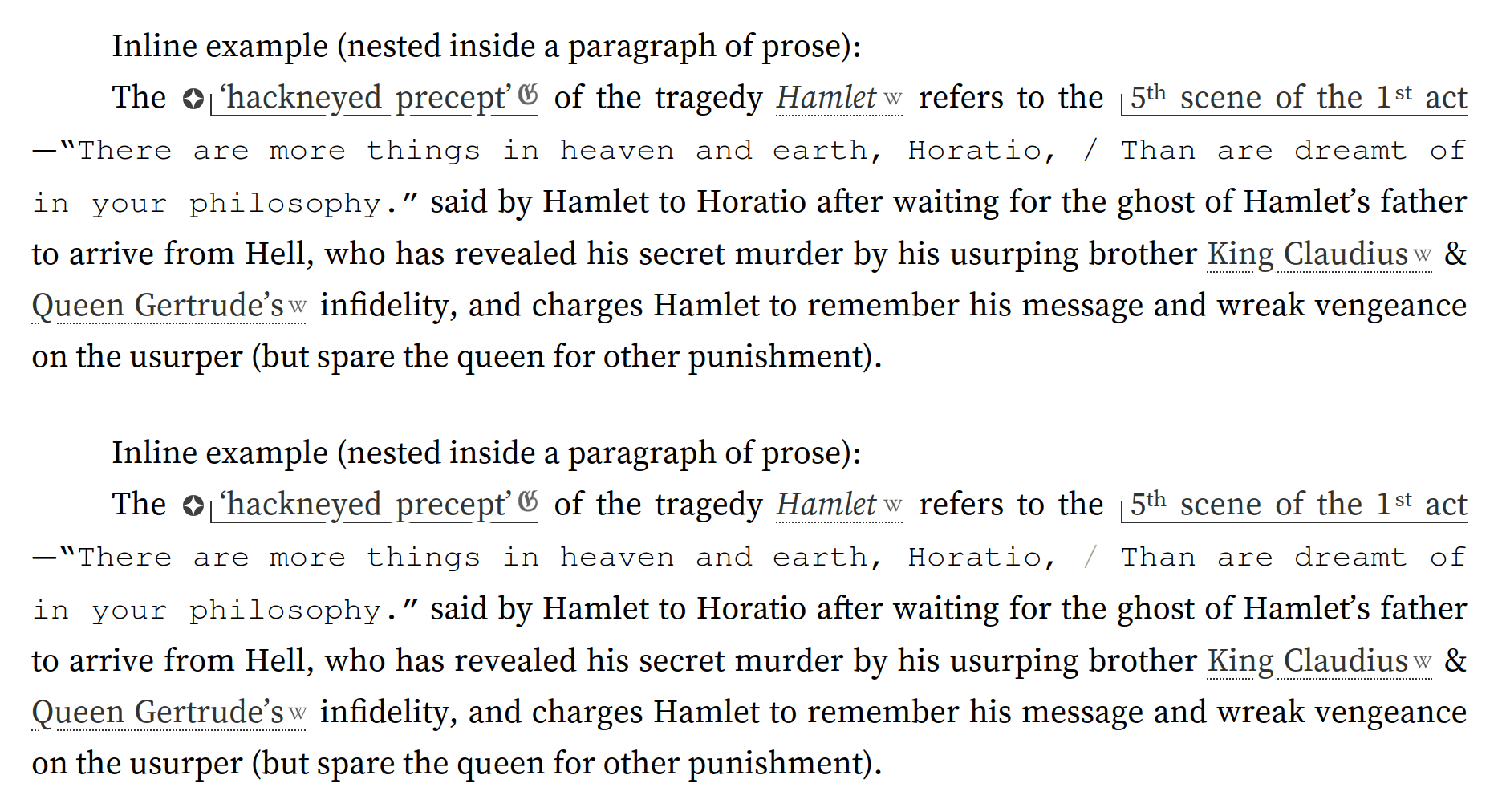
This is done client-side because it is cheap (there are usually no such spans, and the spans are short) and it reduces the burden to the author to just adding a span.poem:
We need to support quotations like ["Alas, poor / Yorick!
I knew him, Horatio—a fellow of infinite jest"]{.poem}.
Caesura Mark Highlighting
The caesura mark for alliterative verse, which separates half-lines/demi-stiches/staves, is usually written in ASCII as a space-separated double-pipeline like " || ".
The double-pipeline is even more obtrusive than the forward slash, I began to notice while working on Perished Paradise and reading many LLM alliterative verse samples formatted with it. There is an alternative Unicode character LATIN LETTER DOUBLE PIPE ‘ǁ’, but it doesn’t work as it is still too large & obtrusive—the unusual dense Unicode glyph draws even more attention to itself, and is a little hard to recognize as two pipes.
So we do another simple rewrite pass to make them big but subtle: we enlarge them, narrow them (by reducing their letter-spacing & tweaking margins), and then fade them out.
And for short alliterative lines, it can be visually attractive to center them in the columns (using our div.text-center CSS), but then you notice the caesura marks don’t quite line up. So the JS/CSS will align caesura marks inside a div.poem.text-center vertically; a simple bit of HTML like:
<div class="poem">
<span class="editorial">[...]</span>

<div class="text-center">
Song is the gift || we give them back. \
We crown with cadence || what we cannot keep.  \
The pact holds; || we pay in gold. \
Count is a kind || of cold keeping.
</div>
</div>
turns into this:
[…]
Song is the gift || we give them back.
We crown with cadence || what we cannot keep.
The pact holds; || we pay in gold.
Count is a kind || of cold keeping.
Which in context is stunning:
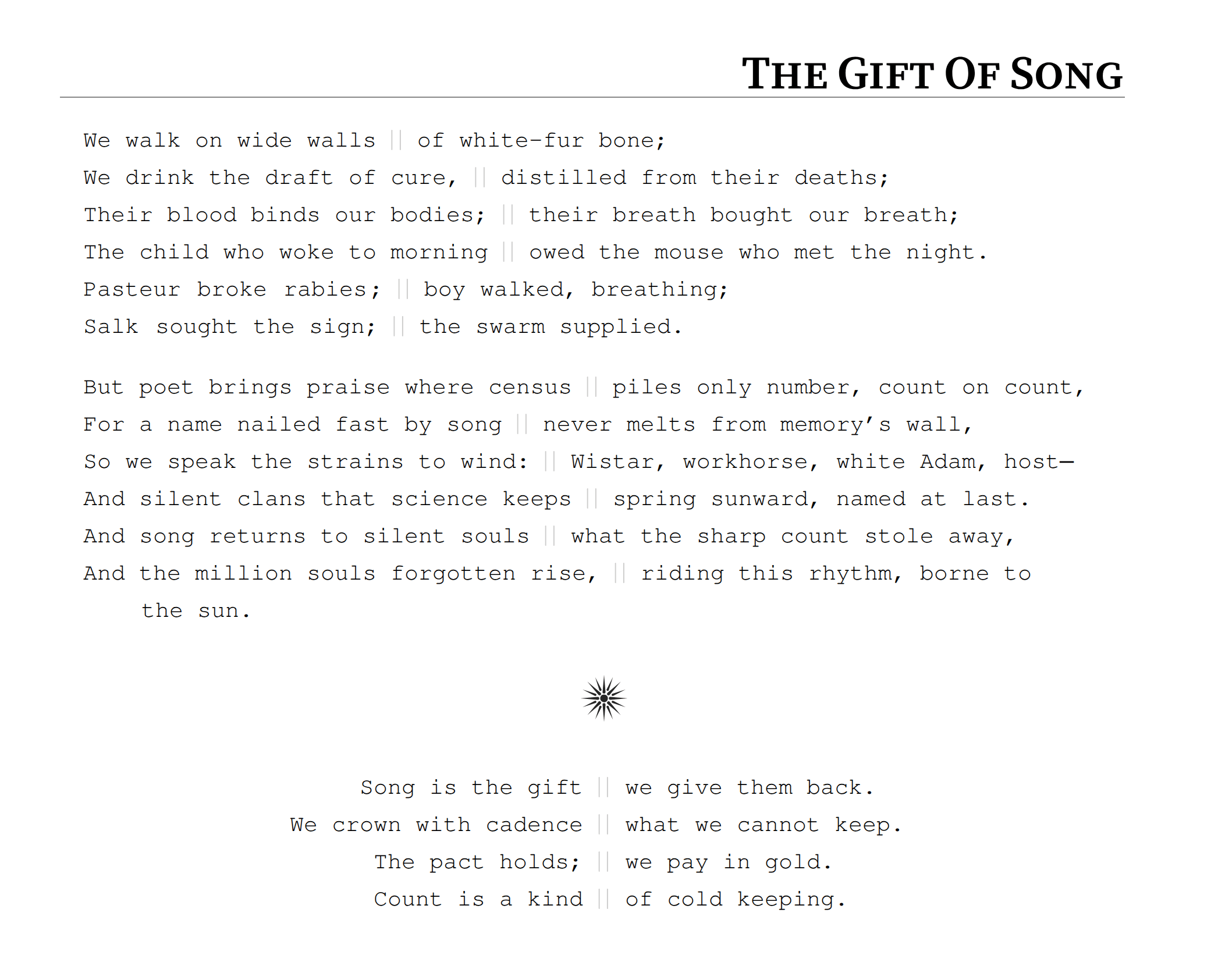
Screenshot of the ending of “Apollonian #1”, demonstrating syntax highlighting of caesura mark and the potential for vertical centering around the caesura mark to beautifully align alliterative half-lines.
Could hardly be easier for the author! (The total JS is substantial, though.)
Simple Block
While just <blockquote> + <br> is not enough, we add CSS tweaks to the div.poem class to make them work:
<div class="poem">
> [Roses are red](!W) \
> Violets are blue, \
> Sugar is sweet \
> And so are *you*.
</div>
Renders nicely as
Roses are red
Violets are blue,
Sugar is sweet
And so are you.
Enjambment
Ah, you say, but what about more complex line-breaking, like enjambment?
The JS overloads the space-separated slash and interprets that as the place to break (which is easy to disable if need be by writing it slightly differently, by adding whitespace or using a different Unicode slash etc.).
<div class="poem">
> Roses are red / Violets are blue, \
> Sugar is sweet / And so are *you*.
</div>
renders as the enjambed form:
Roses are red / Violets are blue,
Sugar is sweet / And so are you.
OK, what if we need to break multiple phrases? The enjambment indentation is relative, so it just continues, staircase-wise:
<div class="poem">
> Roses are red / Violets are blue, / Sugar is sweet / And so are *you*.
</div>
Roses are red / Violets are blue, / Sugar is sweet / And so are you.
The repeated forward slash assumes staircase-wise because this is one of the more common patterns. Sometimes poems will indent ‘once’ and line up vertically afterwards in a continued column without any additional indentation, or sometimes will even reverse and subtract indentation; these other two rarer indentation patterns are not writable without pre.poem-html If one wanted to write many such poems and avoid the heavier-weight format, one could imagine augmenting the forward slash syntax to /, //, and ///7 to encode ‘break and add indentation’, ‘break and add 0 indentation’, and ‘break and add negative indentation’ respectively.
Nicer Line-Breaking
One final flourish we added was to modify the line-breaking behavior to break at more semantically sensible places.
Unfortunately in poetry, if we line-break a too-long line at wherever typographically convenient, this can disrupt the flow of reading by creating widows and orphans, because poetic syntax is often far harder than prose, and a phrase broken in half which is no problem for a prose reader may throw off and force a poem reader to reread.
It is too much work to ask authors to insert good semantic breakpoints, while automatically breaking is an AI-complete problem. (That is, we could try to use an LLM to mark up poetry lines to force it to break at a sensible place—you’d replace all the regular spaces with non-breaking spaces in the ‘last phrase’ to force the browser to line-break it as a unit—but I haven’t gone that far yet.)
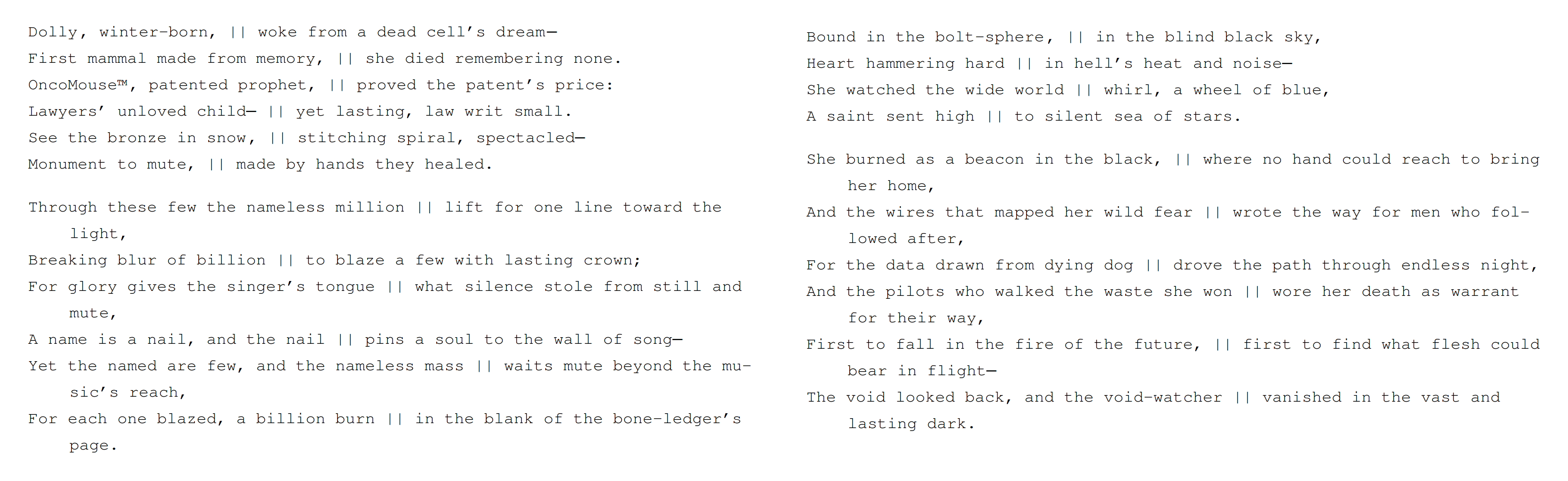
Example of two parts of “Apollonian #1” which do and do not line-break a single word by default; the former tends to trip you up mentally.
Heuristically, if we break a single word, that’s always bad. So our JS forces line-breaks to have at least two words.
(One might think that the CSS text-wrap: pretty property, which exists for this purpose, but it is poorly supported and when we tried it previously, had undocumented, unpredictable, nasty typographic side-effects.)
Overall
This gets us all of our criteria: all poems are fully searchable/copy-pastable/printable (eg), screen-reader-friendly, have responsive design and render well on mobile as much as possible, are intuitive to author by someone familiar with Markdown & poetry, with fun features like syntax highlighting, which scale to concrete poetry examples, while being compatible with site features.
The major cost is that it requires some CSS/JS, but this is a fair price to pay for a robust poetry solution.
We implemented this system on Gwern.net October–December 2025, upgrading all known poems in place (see below), and are satisfied with the results.
Appendix
Narrow Lines: True vs Typographic Breaks
A reader sent in anonymous feedback pointing out that there was one typesetting edge-case we do not handle: on a narrow window, when a line is line-broken, how does the reader know when it was a ‘typographic’ linebreak due to the narrow window or if the author specified a true ‘semantic’ linebreak?
The usual approach is to indent a ‘typographic’ linebreak by a few spaces… But what if the author innocently happened to specify an indent which looked similar to that linebreak? On extremely narrow windows, such as mobile smartphone browsers, there are many typographic linebreaks, and if a poem does anything fancy with indents, it quickly becomes ambiguous which is a typographic and which a semantic line-break.
They had an EPUB typography trick for that, which is essentially zebra striping.
This struck me as a real problem and a reasonable solution, and so we spent a while trying it out.
But this whole category of solutions doesn’t work in responsive HTML. Krabat’s approach of fading out lines has legibility issues; we cannot color lines because we are committed to a mono-chromatic; alternating bold/italic is out because those are harder to read in bulk or already heavily used inside poems; various attempts at drawing vertical lines or boxes floundered.
The best thing we tried was a ‘long dash’ approach where a typographic broken line gets a long thin EM DASH ‘filling in’ the gap, loosely inspired by historical approaches where a solid line might fill in the rest of a line rather than hyphenate.
This looked reasonably nice, but turned out to have intractable JS/HTML implementation issues: it just isn’t possible to reliably find properties of lines such as “was line-broken”; clientRects of the same line of text can have different vertical extents, for no discernible reason, frustrating this kind of layout (as well as many other desirable tweaks, like adjusting the whitespace above horizontal rulers based on whether the previous line of text is short or long). Despite Achmiz’s best effort, we would see visual bugs like two long-dashes slightly above each other, where the heuristic failed.
After a month or two of trying it live in 2026, we had to remove it entirely, and currently have no solution for this problem.
Finding Existing Poems in Corpus
After setting up the full suite of poem formatting, the biggest problem turned out to be finding the poems to markup.
Gwern.net was 15 years old and has quite a lot of poetry here and there, and no single consistent way of writing them. Once I marked up the easy cases found by grep, then what?
The problem with poetry is that it is a semantic category, not syntactic; what makes the quote inside As every kindergartner knows, "Roses are red" something to wrap in a span.poem rather than a simple prose statement of fact? Well, “you know it when you see it”; you know that it’s a quote from a famous poem.
So, this makes it a good use-case for LLMs—LLMs definitely know that’s from a famous poem!
I had GPT-5.1 Pro write me a one-off script using a cheap LLM (GPT-4.1-mini) to read Gwern.net-style Pandoc Markdown files, and spit out any instances of poetry which is not already wrapped. poem-finder.py:
#!/usr/bin/env python3
# -*- coding: utf-8 -*-
"""
poem-finder.py (report-only)
Print un-marked-up poems/verse found in a Pandoc Markdown file.
No modifications are made.
Detects candidates (conservatively):
- strict blockquotes (every line starts with '>')
- fenced code blocks (``` or ~~~)
- indented code blocks (4 spaces or tab)
- HTML <pre> ... </pre> blocks
- inline "slash linebreak" verse (very conservative; optional)
Skips anything already in poem markup:
- <div class="poem"> ... </div>
- ::: {.poem} fenced div blocks
- <span class="poem">...</span> (inline)
- Pandoc inline attr spans: {... .poem} / [{...}]{.poem}
Usage:
$ OPENAI_API_KEY="sk-..." ./poem-finder.py path/to/file.md > poems.txt
$ ./poem-finder.py --jsonl path/to/file.md | jq .
"""
from __future__ import annotations
import argparse
import hashlib
import json
import os
import re
import sys
from dataclasses import dataclass
from pathlib import Path
from typing import Any, Dict, List, Optional, Tuple
from openai import OpenAI
# ----------------------------
# Helpers
# ----------------------------
def sha256_text(s: str) -> str:
return hashlib.sha256(s.encode("utf-8")).hexdigest()
def eprint(*args: Any, **kwargs: Any) -> None:
print(*args, file=sys.stderr, **kwargs)
def parse_json_object(s: str) -> Optional[Dict[str, Any]]:
s = (s or "").strip()
if s.startswith("```"):
s = re.sub(r"^```[a-zA-Z0-9_-]*\s*", "", s)
s = re.sub(r"\s*```$", "", s)
m = re.search(r"\{.*\}", s, flags=re.DOTALL)
if not m:
return None
try:
return json.loads(m.group(0))
except Exception:
return None
# ----------------------------
# Poem markup region tracking
# ----------------------------
DIV_OPEN_RE = re.compile(r"<div\b", re.IGNORECASE)
DIV_CLOSE_RE = re.compile(r"</div\b", re.IGNORECASE)
DIV_CLASS_RE = re.compile(r"<div\b[^>]*\bclass\s*=\s*(?P<q>[\"'])(?P<cls>.*?)(?P=q)", re.IGNORECASE)
PANDOC_FENCED_DIV_RE = re.compile(r"^([ \t]*)(:{3,})([ \t]*)(?P<attrs>\{.*\})?\s*$")
def class_contains_poem(cls: str) -> bool:
parts = re.split(r"\s+", (cls or "").strip())
return any(p.strip().strip(",;") == "poem" for p in parts)
def line_opens_poem_div(line: str) -> bool:
if "<div" not in line.lower():
return False
m = DIV_CLASS_RE.search(line)
if not m:
return False
return class_contains_poem(m.group("cls"))
def update_div_stack(line: str, div_stack: List[bool]) -> None:
# close tags pop stack
closes = len(DIV_CLOSE_RE.findall(line))
for _ in range(closes):
if div_stack:
div_stack.pop()
# open tags push, flagging poem divs
opens = len(DIV_OPEN_RE.findall(line))
is_poem = line_opens_poem_div(line)
for _ in range(opens):
div_stack.append(is_poem)
def update_fenced_div_stack(line: str, fenced_stack: List[Tuple[int, bool]]) -> None:
m = PANDOC_FENCED_DIV_RE.match(line.rstrip("\n"))
if not m:
return
fence_len = len(m.group(2))
attrs = m.group("attrs") or ""
# closing marker usually has no attrs
if attrs == "" and fenced_stack:
# pop most recent matching fence len, else pop last
idx = None
for k in range(len(fenced_stack) - 1, -1, -1):
if fenced_stack[k][0] == fence_len:
idx = k
break
if idx is None:
fenced_stack.pop()
else:
fenced_stack.pop(idx)
return
is_poem = ".poem" in attrs
fenced_stack.append((fence_len, is_poem))
def in_poem_region(div_stack: List[bool], fenced_stack: List[Tuple[int, bool]]) -> bool:
return any(div_stack) or any(is_poem for _, is_poem in fenced_stack)
# ----------------------------
# Candidate block detection
# ----------------------------
FENCE_START_RE = re.compile(r"^([ \t]*)(?P<fence>`{3,}|~{3,})(?P<info>.*)$")
BLOCKQUOTE_RE = re.compile(r"^[ \t]*>")
PRE_OPEN_RE = re.compile(r"^[ \t]*<pre\b", re.IGNORECASE)
PRE_CLOSE_RE = re.compile(r"</pre\s*>", re.IGNORECASE)
@dataclass(frozen=True)
class Block:
kind: str # "blockquote" | "fenced_code" | "indented_code" | "html_pre" | "inline_slash"
start: int # 0-based line index (for inline: line index)
end: int # inclusive (for inline: same as start)
raw_lines: List[str] # original lines (keepends=True), or [line] for inline
text_for_llm: str # normalized content
extra: Dict[str, Any] # metadata
def capture_fenced_code(lines: List[str], i: int) -> Optional[Tuple[int, List[str]]]:
m = FENCE_START_RE.match(lines[i].rstrip("\n"))
if not m:
return None
fence = m.group("fence")
fence_char = fence[0]
fence_len = len(fence)
j = i + 1
end = i
while j < len(lines):
s = lines[j].lstrip(" \t")
if s.startswith(fence_char * fence_len):
end = j
break
j += 1
else:
end = len(lines) - 1
return end, lines[i:end + 1]
def capture_pre(lines: List[str], i: int) -> Optional[Tuple[int, List[str]]]:
if not PRE_OPEN_RE.match(lines[i]):
return None
j = i
end = i
while j < len(lines):
if PRE_CLOSE_RE.search(lines[j]):
end = j
break
j += 1
else:
end = len(lines) - 1
return end, lines[i:end + 1]
def is_indented_code_start(line: str) -> bool:
if line.strip() == "":
return False
if FENCE_START_RE.match(line.rstrip("\n")):
return False
if BLOCKQUOTE_RE.match(line):
return False
return line.startswith(" ") or line.startswith("\t")
def capture_indented_code(lines: List[str], i: int) -> Tuple[int, List[str]]:
j = i
end = i
while j < len(lines):
ln = lines[j]
if ln.strip() == "":
end = j
j += 1
continue
if ln.startswith(" ") or ln.startswith("\t"):
end = j
j += 1
continue
break
return end, lines[i:end + 1]
def capture_blockquote(lines: List[str], i: int) -> Tuple[int, List[str]]:
j = i
end = i
while j < len(lines) and BLOCKQUOTE_RE.match(lines[j]):
end = j
j += 1
return end, lines[i:end + 1]
def normalize_blockquote_text(raw: List[str]) -> str:
out: List[str] = []
for ln in raw:
m = re.match(r"^[ \t]*>[ \t]?(.*)$", ln.rstrip("\n"))
out.append(m.group(1) if m else ln.rstrip("\n"))
return "\n".join(out).strip("\n")
def normalize_fenced_code_text(raw: List[str]) -> str:
if len(raw) < 2:
return ""
inner = raw[1:-1]
return "".join(inner).rstrip("\n")
def normalize_indented_code_text(raw: List[str]) -> str:
out: List[str] = []
for ln in raw:
s = ln.rstrip("\n")
if s.startswith("\t"):
out.append(s[1:])
elif s.startswith(" "):
out.append(s[4:])
else:
out.append(s)
return "\n".join(out).strip("\n")
def normalize_pre_text(raw: List[str]) -> str:
joined = "".join(raw)
# crude stripping of <pre ...> and </pre>
joined = re.sub(r"^[ \t]*<pre\b[^>]*>\s*", "", joined, flags=re.IGNORECASE)
joined = re.sub(r"</pre\s*>\s*$", "", joined, flags=re.IGNORECASE)
return joined.strip("\n")
# ----------------------------
# Inline slash-verse detection (conservative)
# ----------------------------
# Only consider punctuation + " / " patterns to avoid filepaths, URLs, ratios, etc.
INLINE_SLASH_RE = re.compile(r"(?P<body>[A-Za-z][^/\n]{0,120}[,;:]\s*/\s*[^/\n]{0,160}[A-Za-z])")
def line_has_poem_markup(line: str) -> bool:
if "{.poem" in line: # }
return True
if 'class="poem"' in line or "class='poem'" in line:
return True
return False
def likely_urlish(line: str) -> bool:
return ("http://" in line) or ("https://" in line) or ("://" in line) or ("www." in line)
def inline_slash_candidates(line: str) -> List[str]:
if " / " not in line:
return []
if likely_urlish(line):
return []
if line_has_poem_markup(line):
return []
# skip inline code spans (very rough): if backticks exist, skip completely
if "`" in line:
return []
cands = []
for m in INLINE_SLASH_RE.finditer(line):
body = m.group("body").strip()
# require at least 2 words on each side (conservative)
parts = [p.strip() for p in body.split("/") if p.strip()]
if len(parts) != 2:
continue
if len(parts[0].split()) < 2 or len(parts[1].split()) < 2:
continue
cands.append(body)
return cands
# ----------------------------
# LLM classification
# ----------------------------
SYSTEM = "You are a careful editor of literary markup for a Pandoc Markdown corpus."
PROMPT = """Decide whether TEXT is a poem/verse (line-breaks or line divisions are part of the content).
Be conservative:
- If uncertain, answer NOT_POEM.
POEM includes: verse, lyrics, hymns, limericks, haiku, epigraph verse, rhymed couplets, any text where line divisions matter.
NOT_POEM includes: prose quotations, dialogue, normal paragraphs, lists, code, logs, configuration, tables, transcripts, citations, math.
KIND: {kind}
TEXT:
<<<
{text}
>>>
Return JSON ONLY with:
- decision: "poem" or "not_poem"
- confidence: integer 0-100
- notes: <= 20 words
No extra keys, no markdown.
"""
def classify(client: OpenAI, model: str, kind: str, text: str, cache: Dict[str, Any], max_chars: int) -> Dict[str, Any]:
text2 = (text or "").strip("\n")
if text2 == "":
return {"decision": "not_poem", "confidence": 0, "notes": "Empty."}
if len(text2) > max_chars:
return {"decision": "not_poem", "confidence": 0, "notes": f"Too long ({len(text2)} chars)."}
key = f"{kind}:{sha256_text(text2)}"
if key in cache:
return cache[key]
completion = client.chat.completions.create(
model=model,
temperature=0,
messages=[
{"role": "system", "content": SYSTEM},
{"role": "user", "content": PROMPT.format(kind=kind, text=text2)},
],
)
raw = completion.choices[0].message.content or ""
obj = parse_json_object(raw) or {"decision": "not_poem", "confidence": 0, "notes": "Parse failure."}
# normalize
decision = str(obj.get("decision", "not_poem")).strip().lower()
conf = int(obj.get("confidence", 0) or 0)
notes = str(obj.get("notes", "")).strip()
out = {"decision": "poem" if decision == "poem" else "not_poem", "confidence": conf, "notes": notes}
cache[key] = out
return out
# ----------------------------
# Main scanning
# ----------------------------
def scan_blocks(lines: List[str], do_inline: bool) -> List[Block]:
blocks: List[Block] = []
div_stack: List[bool] = []
fenced_stack: List[Tuple[int, bool]] = []
i = 0
while i < len(lines):
line = lines[i]
# Code/pre blocks are opaque: do not update poem-region state based on their contents.
fc = capture_fenced_code(lines, i)
if fc is not None:
end, raw = fc
if not in_poem_region(div_stack, fenced_stack):
text = normalize_fenced_code_text(raw)
blocks.append(Block(kind="fenced_code", start=i, end=end, raw_lines=raw, text_for_llm=text, extra={}))
i = end + 1
continue
pb = capture_pre(lines, i)
if pb is not None:
end, raw = pb
if not in_poem_region(div_stack, fenced_stack):
text = normalize_pre_text(raw)
blocks.append(Block(kind="html_pre", start=i, end=end, raw_lines=raw, text_for_llm=text, extra={}))
i = end + 1
continue
if is_indented_code_start(line):
end, raw = capture_indented_code(lines, i)
if not in_poem_region(div_stack, fenced_stack):
text = normalize_indented_code_text(raw)
blocks.append(Block(kind="indented_code", start=i, end=end, raw_lines=raw, text_for_llm=text, extra={}))
i = end + 1
continue
# Blockquote block: treat as a unit, but still update region stacks line-by-line as we consume it.
if BLOCKQUOTE_RE.match(line):
poem_region_now = in_poem_region(div_stack, fenced_stack)
end, raw = capture_blockquote(lines, i)
if not poem_region_now:
# skip if it already contains poem markup (rare but cheap check)
if not any(line_has_poem_markup(ln) for ln in raw):
text = normalize_blockquote_text(raw)
blocks.append(Block(kind="blockquote", start=i, end=end, raw_lines=raw, text_for_llm=text, extra={}))
# update stacks over the consumed lines
for j in range(i, end + 1):
update_fenced_div_stack(lines[j], fenced_stack)
update_div_stack(lines[j], div_stack)
i = end + 1
continue
# Normal line: update region tracking.
update_fenced_div_stack(line, fenced_stack)
update_div_stack(line, div_stack)
# Inline scan (only outside poem regions, and only if enabled).
if do_inline and not in_poem_region(div_stack, fenced_stack):
if not line_has_poem_markup(line):
cands = inline_slash_candidates(line.rstrip("\n"))
for body in cands:
blocks.append(Block(
kind="inline_slash",
start=i,
end=i,
raw_lines=[line],
text_for_llm=body,
extra={"line": line.rstrip("\n"), "match": body},
))
i += 1
return blocks
def load_cache(path: Optional[Path]) -> Dict[str, Any]:
if path is None:
return {}
try:
return json.loads(path.read_text(encoding="utf-8"))
except FileNotFoundError:
return {}
except Exception:
return {}
def save_cache(path: Optional[Path], cache: Dict[str, Any]) -> None:
if path is None:
return
path.parent.mkdir(parents=True, exist_ok=True)
tmp = path.with_suffix(path.suffix + ".tmp")
tmp.write_text(json.dumps(cache, indent=2, ensure_ascii=False, sort_keys=True), encoding="utf-8")
tmp.replace(path)
def main(argv: Optional[List[str]] = None) -> int:
ap = argparse.ArgumentParser(description="Print unmarked poems/verse in a Markdown file (report-only).")
ap.add_argument("path", help="Input Markdown file.")
ap.add_argument("--model", default="gpt-4.1-mini", help="OpenAI model name.")
ap.add_argument("--threshold", type=int, default=75, help="Min confidence required to report as poem.")
ap.add_argument("--max-chars", type=int, default=5000, help="Max chars per candidate sent to LLM.")
ap.add_argument("--inline", action="store_true", help="Also scan inline slash-verse candidates.")
ap.add_argument("--jsonl", action="store_true", help="Output JSONL objects instead of text report.")
ap.add_argument("--cache", default=str(Path.home() / ".cache" / "poem-finder-report-cache.json"), help="Cache path.")
ap.add_argument("--no-cache", action="store_true", help="Disable cache read/write.")
ap.add_argument("--show-notes", action="store_true", help="Include LLM notes in text output.")
ap.add_argument("--limit", type=int, default=0, help="Stop after reporting N poems (0 = no limit).")
args = ap.parse_args(argv)
path = Path(args.path)
text = path.read_text(encoding="utf-8")
lines = text.splitlines(keepends=True)
cache_path = None if args.no_cache else Path(args.cache)
cache = load_cache(cache_path)
client = OpenAI()
candidates = scan_blocks(lines, do_inline=args.inline)
reported = 0
for blk in candidates:
# extra “already marked” guard
if blk.kind != "inline_slash":
if any(line_has_poem_markup(ln) for ln in blk.raw_lines):
continue
result = classify(client, args.model, blk.kind, blk.text_for_llm, cache, args.max_chars)
if result["decision"] != "poem" or int(result["confidence"]) < args.threshold:
continue
reported += 1
if args.jsonl:
obj = {
"file": str(path),
"kind": blk.kind,
"start_line": blk.start + 1,
"end_line": blk.end + 1,
"confidence": int(result["confidence"]),
"notes": result["notes"],
"text": blk.text_for_llm,
"raw": "".join(blk.raw_lines),
}
print(json.dumps(obj, ensure_ascii=False))
else:
print("-" * 80)
print(f"{path}:{blk.start+1}-{blk.end+1} kind={blk.kind} confidence={int(result['confidence'])}")
if args.show_notes and result.get("notes"):
print(f"notes: {result['notes']}")
print()
print(blk.text_for_llm.strip("\n"))
print()
print("RAW:")
sys.stdout.write("".join(blk.raw_lines))
if not blk.raw_lines[-1].endswith("\n"):
print()
if args.limit and reported >= args.limit:
break
save_cache(cache_path, cache)
if not args.jsonl:
eprint(f"[poem-finder] reported {reported} poems (threshold={args.threshold}, inline={args.inline})")
return 0
if __name__ == "__main__":
raise SystemExit(main())After some tuning and pilot runs, and one or two tweaks I forget, the script found a good 20–50 remaining instances, which I then fixed. I have not noticed many, if any, unmarked poems since. I don’t know how much it cost to run the script a few times on the site corpus, but I didn’t notice it on my OA API bill, so I assume it cost <$5; well worth the money!
This is the most sensible version of various solutions that some Internet authors have used, like ‘insert periods and turn them white with CSS’.↩︎
Because of the LaTeX, which we rewrite from rendered compiled MathJax gunk back to the original plain text LaTeX expressions that readers expect.↩︎
You can in theory do this, but you would have to write raw HTML, and you may have difficulty getting source code features like syntax highlighting or line numbering to work.↩︎
Which has nicer italics than any of the others did, so I regret not being able to use it.↩︎
Some other fonts of interest: Logic Monospace, IBM Plex Serif, Iosevka Etoile, Aleo, Cutive, B612, iA Writer Mono/Duo/Quattro, Jackwrite, Zilla Slab, Bitter, BioRhyme. Perhaps future Variable fonts will expand the repertoire in the future.↩︎
It’s still not accessible to a blind reader, but with concrete poetry like the grasshopper poem, that’s impossible. This is about as good as we can do; the only way to improve on it would be to try to provide some sort of verbal summary or description, which is way out of scope for the formatting.↩︎
One might suggest a more mnemonic syntax of forward-slash to add positive (more rightwards) indentation, a single pipe to keep the same indentation (continue straight down), and a backd-slash to subtract indentation (more leftwards), rather than intensifying forward-slashes, so it would be
/,|, and\.The problem with that version is that the other two are dangerous: a space-separated pipe is used in many other contexts, like Pandoc Markdown tables or Unix shell scripting or logical OR notation. And a single backslash can’t be written at all in Pandoc Markdown because it is used to escape special characters and so a single space-separated backslash would actually be compiled into two spaces (the first space, then the second space which was ‘escaped’ by the backslash) which would then be invisible and collapsed in HTML to a single visible space! So you would have to write a double-backslash (ie. escape the escaping),
\\, to get an output\, which would defeat the point of being intuitive.↩︎